Sarthak's Complete Linux Settings, Solutions and Troubleshooters:
Dual-Booting Linux and Windows:
Dual Booting is differnt for UEFI an Legacy Laptops:
- My Hp-ck2018tu Laptop: UEFI GPT
- Hp Student Laptop: UEFI/Legacy MBR
Installing on:
- UEFI GPT =>
Uninstalling on:
- UEFI GPT =>
- Step 1: Deleting the Linux Partition
- Step-2: Removing the manjaro( GRUB Bootloader) from EFI Partition
- A Youtube Tutorial
My LInux Troubleshooters
Manjaro Linux (KDE):
Linux Commands to Install and Unsinstall:
sudo pacmancommands: https://wiki.archlinux.org/title/pacman
Removing a uninstalled repository remaining hidden
- Removing a uninstalled repository remaining hidden:
The repo should be specified in "/etc/pacman.conf". Just edit the file and remove it or comment it out by putting # in the beginning of the line.
Visual Stude Code
- ERROR while "Sign in" or "Connecting to Github"
Error message:secret_password_clear_sync() failed with error code 2: The name org.freedesktop.secrets was not provided by any .service files
Solution: you likely don't have gnome-keyring and libsecret installed.In "Terminal" Run👇↲:
sudo pacman -S gnome-keyring libsecret
Then restart PC.
Also can Follow this Vs Code Issue here: https://github.com/MicrosoftDocs/live-share/issues/224
Configuring Git
Configuring Git for "Cloning" and "Submitting File":
- Run the following Commands:
git config --global user.name "cosmicsarthak"git config --global user.email "sarthakmohanty200@gmail.com"Then I can Check its corect or not by👉:
git config user.nameorgit config user.emailorgit config list
It should show like this👇:user.name=cosmicsarthak
user.email=sarthakmohanty200@gmail.com...
Change your default git branch name to main by Terminal
You can set the default parameters for any new git repo you initialize in your global git config settings. The default directory that git reads from is ~/.gitconfig. You can see what your current settings are by running the following command in your terminal emulator:⏬
git config --global --list
Let’s make a custom directory to hold our new configuration files. Create a directory called .git-template in your home directory. ⏬
mkdir ~/.git-template
Now, add a file named HEAD (no extensions) and add the following lines in the file named HEAD: ⏬
ref: refs/heads/main
Then Run👇↲ to add to git configuration settings
git config --global init.templateDir ~/.git-template
In Windows, while installing
gitwe get the option to choosedefault branchasmain(Always set default branch asmain)
Disabling baloo_file_extractor (taking a lot of RAM)
- Check Status:
balooctl status
- Stop baloo:
balooctl disable
Then again run balooctl status
- Renove baloo:
rm -rf ~/.local/share/baloo
Garuda Linux (KDE Dr460nized):
Linux Commands to Install and Unsinstall:
sudo pacmancommands: https://wiki.archlinux.org/title/pacman
Enabling Tap-to-click
- Garuda Linux has disabled tap-to-click by default. Follow these steps to enable tap-to-click in Garuda Linux.
Follow these steps carefully, it requires root(sudo) privileges.
1. In the Terminal run these 2 commands👇:sudo pacman -S --needed xf86-input-libinputsudo micro /etc/X11/xorg.conf.d/30-touchpad.conf
Copy the following text👇:
Section "InputClass"
    Identifier "touchpad"
    Driver "libinput"
    MatchIsTouchpad "on"
    Option "Tapping" "on"
    Option "TappingButtonMap" "lrm"
    Option "NaturalScrolling" "on"
    Option "ScrollMethod" "twofinger"
EndSection
4. paste this text into 30-touchpad.conf (file opened in step 1) 5. save the file (Ctrl + s)
6. quit the editor (Ctrl + q)
7. Reboot
If you follow these steps carefully, tap to click and right click should be enabled.
libinput is being used/configured here
Tip: Visit https://wiki.archlinux.org/index.php/Libinput for more configuration of touchpad
Software Centre
pamacis to be used as Software centre (optopiis not supported [as of July 2021]) ### Visual Stude Code - ERROR while "Sign in" or "Connecting to Github"
Error message:secret_password_clear_sync() failed with error code 2: The name org.freedesktop.secrets was not provided by any .service files
Solution: you likely don't have gnome-keyring and libsecret installed.In "Terminal" Run👇↲:cpp sudo pacman -S gnome-keyring libsecretThen restart PC.
Also can Follow this Vs Code Issue here: https://github.com/MicrosoftDocs/live-share/issues/224
Configuring Git - Configuring Git for "Cloning" and "Submitting File":
- Run the following Commands:
git config --global user.name "cosmicsarthak"git config --global user.email "sarthakmohanty200@gmail.com"Then I can Check its corect or not by👉:git config user.nameorgit config user.emailorgit config list
It should show like this👇:user.name=cosmicsarthak user.email=sarthakmohanty200@gmail.com### VS Code Terminal ERROR⏩ manpath: can't set the locale; make sure $LC** and $LANG are correct - Step 1: *open the terminal in vscode and typelocaleand see which language it is in. It should be inLANG=en_GB.UTF-8- Step 2. type in the terminal sudonano /etc/locale.genand scroll down and remove#in front the language which is in my caseen_GB.UTF-8then >ctrl+xthen pressyafter thatenter_if using TERMINAL
> or I can do this in any EDITOR at/etc/locale.gen. - Step 3. type in terminalsudo locale-genthat it ! it is solved!
Disabling baloo_file_extractor (taking a lot of RAM)
- Check Status:
balooctl status
- Stop baloo:
balooctl disable
Then again run balooctl status
- Renove baloo:
rm -rf ~/.local/share/baloo
Reseting Customisations & Themes to Default
Garuda Welcome >> Garuda Assistant >> Reset All Configs
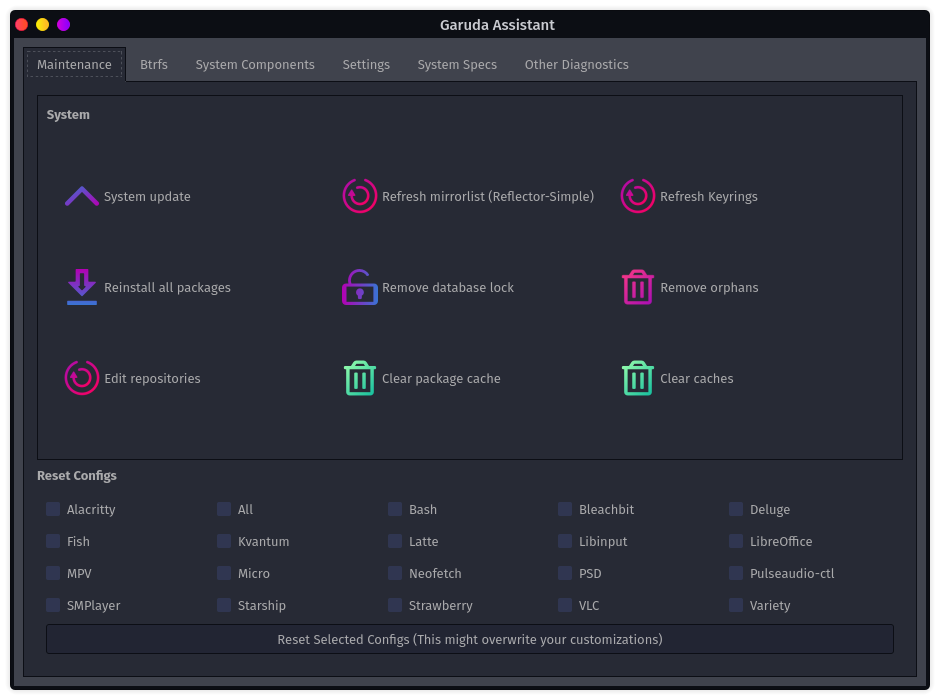
Changing Default Apps / Software
~/.profile
- go to
~/.profileand change the names of the App you want as Default.
Ubuntu:
- ..
- ...
Arch Linux (KDE / i3wm):
Garuda Linux (KDE Dr460nized):
Linux Commands to Install and Unsinstall:
sudo pacmancommands: https://wiki.archlinux.org/title/pacman- ..
- ...
- ...
Some Important Tutorials:
- https://www.youtube.com/playlist?list=PLe1ekPYoWkEEOc97kjk4eQ01O9umF3OYm
- https://www.youtube.com/playlist?list=PLe1ekPYoWkEFiEApk9pUPj2Xbbqa9_NeM
- https://www.youtube.com/playlist?list=PLe1ekPYoWkEE8qkbqaTkr6XAewhGgxqz3
- ...